Personal records
Worked out from the log itself. Nothing is entered twice and nothing can drift — correct a row in the sheet and the records follow.
While you train
One strip under each exercise name:
  Barbell Bench Press                                   [− 4 sets +]
  Best 8 × 100 lb  ·  est 1RM 127  ·  on 2026-07-19
Beat it and a tag joins the strip, and the set that takes the record is starred:
  Best 8 × 100 lb · est 1RM 127 · on 2026-07-19 · ★ personal best today

       Reps    Weight (lb)    RPE
 1       8         105          8
 2 ★    10         105          9      ← the set that actually takes it
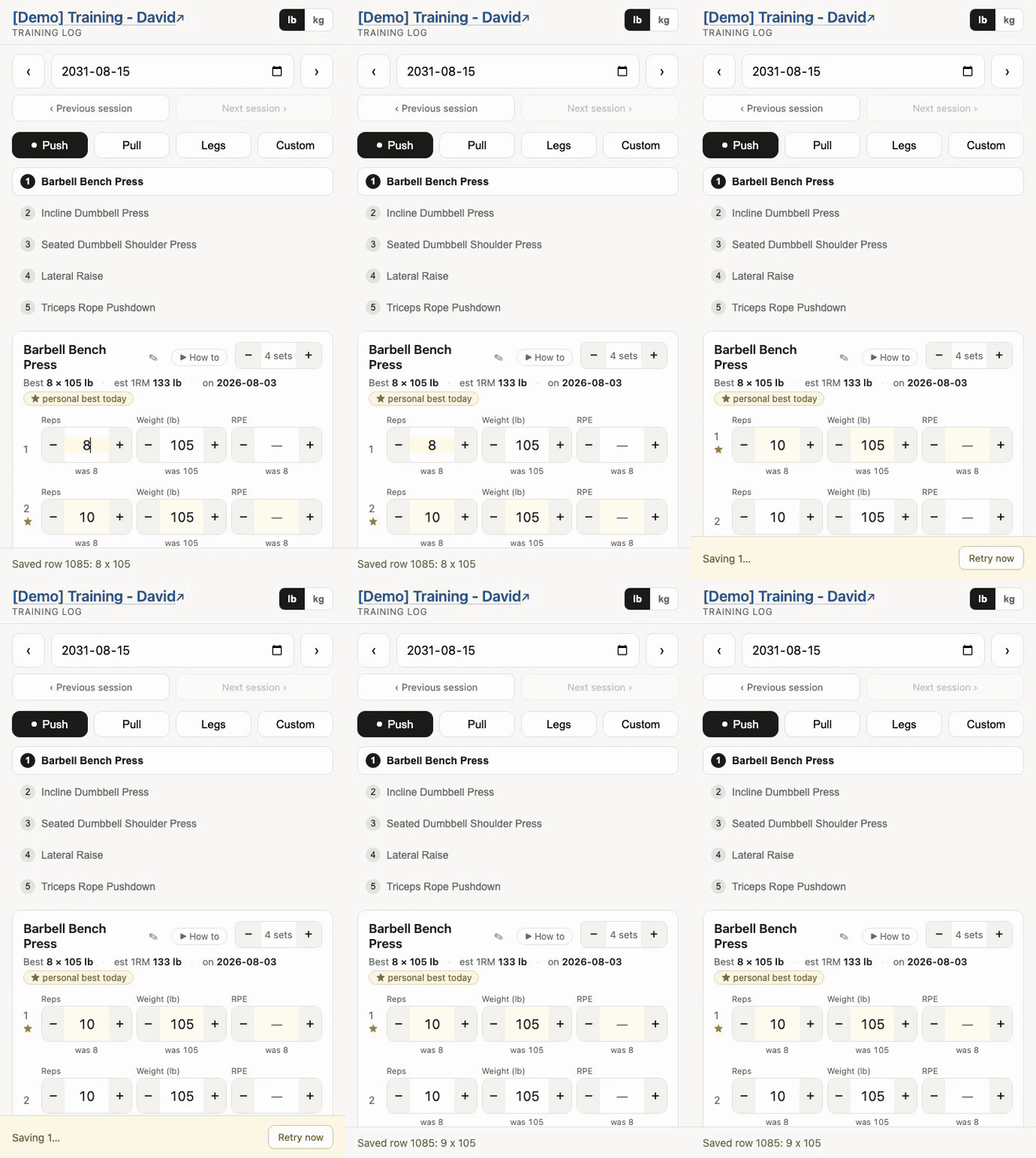
Only one set is marked per exercise. Progression steps a whole session up together, so in a typical week every set beats last time — marking them all meant a card lit end to end, which told you nothing. The mark goes to the set that would become the new record: heaviest, and at equal weight the one with more reps or seconds.
Both update as you tap. Judged against everything except the session you are in, so today’s earlier sets do not become the bar for today’s later ones.
For a loaded lift the marker is a weight record. With no weight there is nothing to load, so it tracks reps — Best 20 reps. With time based it tracks duration — Longest 45s. A timed exercise gets no estimated 1RM, since the number means nothing for a hold.
In the sheet
The Records tab, one row per record:
| Exercise | Record | Value | Detail | Date | Day |
|---|---|---|---|---|---|
| Barbell Bench Press | Heaviest | 105 | 8 x 10⁵ | 2026-08-09 | Push |
| Barbell Bench Press | Heaviest at 5+ reps | 100 | 8 x 100 | 2026-07-19 | Push |
| Barbell Bench Press | Est. 1RM | 132.3 | 8 x 10⁵ | 2026-08-09 | Push |
| Pull-Up | Most reps | 12 | 12 x 0 | 2026-08-02 | Pull |
Rewritten by Training → Rebuild records, by deleting a session, and by archiving — never while you are logging, since a rebuild is a full pass over the Log. The strip inside the app is live regardless: it is worked out from the Log on every load and never reads this tab.
The Records tab is output. Anything you type there is erased on the next rebuild.
Choosing what to track
Two rows on the Settings tab:
| key | value |
|---|---|
pr_rep_targets | 1,5,10 |
pr_metrics | est1rm,volume,reps |
pr_rep_targets — a rep count list. Each one gives a “heaviest weight for a set of at least this many reps” record. 1,3,5 for powerlifting, 8,12,20 for higher-rep work, whatever you like.
Keep 1: “at least 1 rep” is simply heaviest ever, and that is what the app shows on the card and marks against.
pr_metrics — any combination of:
| Value | Record |
|---|---|
est1rm | Best estimated one-rep max. Skipped for timed exercises. |
volume | Best single set, reps × weight |
reps | Most reps in one set — or Longest hold for a timed one. The useful record for bodyweight work. |
session | Most total volume for that exercise in one session |
Rep targets follow the same rule: for a timed exercise pr_rep_targets reads as seconds, so Heaviest at 30+ seconds is a loaded carry record.
Blank drops them all and keeps only the rep targets. Rebuild after editing.
No Settings tab? Defaults apply — 1,5,10 and est1rm,volume,reps. An older spreadsheet keeps working untouched.
About the estimated 1RM
Epley’s formula: weight × (1 + reps ÷ 30). Eight reps at 100 lb estimates 127 lb.
It exists to compare sets that are not otherwise comparable — is 5 × 100 better than 10 × 80? — and it drifts optimistic above about ten reps. Treat it as a way of ranking your own sets against each other, not a weight to walk up to and attempt.
Sets at 0 lb produce no estimate at all.
What happens to records when you archive
Records come from what is in the Log tab, so archiving a period removes its bests from the live app. The archive file keeps its own Records tab, so they are preserved — just no longer competing with current training.